Since PHP Vitals v1.2 introduced dynamic grading and comparisons by hosting type (shared hosting, VPS, etc), thousands of WordPress sites have run PHP performance tests and contributed results to the global leaderboard. Grades shift as hosting improves around the world, and the leaderboard keeps getting more useful as a way to compare what different providers actually deliver.
With PHP Vitals v1.6, the big news is that we’re not just benchmarking your PHP performance, we’re helping you improve it. There are other upgrades, too, based on user feedback. Many of you want to run benchmarks regularly and keep a record on your own site—without necessarily sharing every result. Others want clearer context for what a grade actually means. And everyone benefits when the test suite can evolve without waiting for a plugin update.
PHP Vitals v1.6 is now available in the WordPress Plugin Directory. Here are the main changes.
Turn your benchmark results into tailored PHP optimization tips
PHP Vitals has always measured and benchmarked PHP performance. Now v1.6 goes a step further and helps you improve that performance.
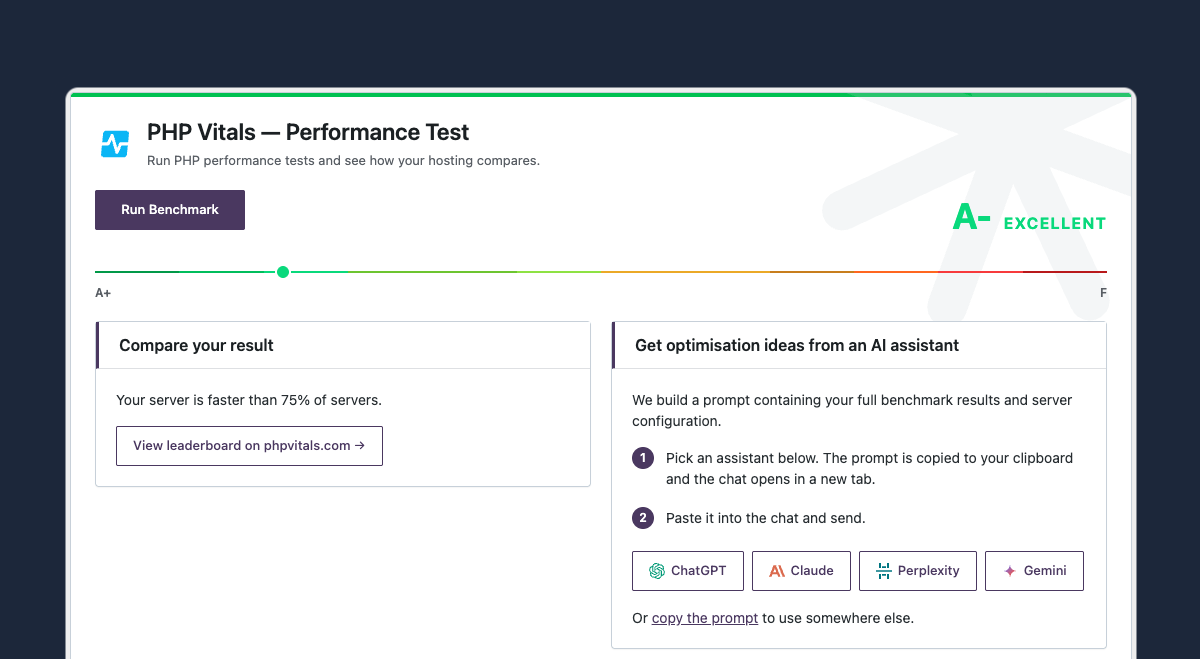
We want this new version of PHP Vitals to be useful for as many website owners as possible, not just skilled web developers. But we can’t expect everyone to understand all 29 tests that make up a PHP Vitals benchmark, or to have deep knowledge of PHP configuration.
Luckily, this is a great use case for AI chatbots. When you run a PHP Vitals benchmark your results will appear onscreen, like they always have, and now a copy of them will be packaged up ready to feed into your favorite bot (Claude, ChatGPT, etc). This package is a copy-and-paste prompt that tells the bot to give you a quick, easy-to-read summary and to suggest code snippets that you can paste into your main PHP configuration file, called php.ini.
It's a quick way to turn raw numbers into actionable suggestions—whether you're wondering about OPcache settings, memory limits, or why one test category lagged behind the others. It all adds up to more power in your hands, and faster PHP no matter who your web host is.
We’re careful about data privacy, so you can be assured that:
- No data is sent to any AI service unless you choose.
- If you do use the pre-prepared AI prompt, nothing identifiable is included. No IP addresses, no hostnames, etc.
- It’s your choice whether you use this feature and you stay in control of what you share and where.
These privacy principles are the same as when you submit results to the leaderboard. It’s your choice, and while your hosting provider is identified, you stay anonymous.
Benchmark history, stored on your site
If you've read our post on why to run regular PHP Vitals benchmarks, you'll know that a single test is useful, but a series of tests over weeks and months is much more valuable. You need a "before" to spot when hosting performance changes.
In earlier versions, benchmark history was tied to leaderboard sharing. In v1.6, every completed run is saved locally in your WordPress database—whether or not you share results. The admin screen shows your last runs with date, total time, and grade, so you can track trends at a glance.
History stays on your site. It is not uploaded to phpvitals.com unless you have leaderboard sharing enabled.
A clearer picture of your grade
A letter grade from A+ to F is easy to read at a glance, but it helps to know where you sit on the scale. v1.6 adds a visual grade rail that marks your exact position from A+ to F, with a short description (Exceptional, Excellent, Good, and so on).
After each run, you'll also see a plain-language comparison—for example, "Your server is faster than 72% of servers" or "Your server is slower than 61% of servers." That percentile context comes from the same dynamic grading system introduced in v1.2, now surfaced directly in the results screen so you don't have to infer it from the letter alone.
A refreshed admin interface
The WordPress admin screen has been redesigned to match the look and feel of phpvitals.com. There's a proper PHP Vitals mark in the header, card-based layout for results and settings, and tables that fit narrow viewports without horizontal scrolling.
We also fixed a few smaller layout issues so buttons and links are fully visible, even on short screens or narrow windows. Small fixes, but they matter when you're running tests on a laptop with a crowded browser window.
Translations and hardening
The admin interface is now fully internationalised, the WordPress community has already translated the plugin into Korean! and there is a Spanish translation included in this release.
We know that the last few months have been intense on the security front for the whole industry, with hundreds of new vulnerabilities. We have made the necessary changes to keep things safe and can confirm that we meet all the security requirements for WP 7.0+.
PHP Vitals v1.6 is available now
Upgrade from the WordPress Plugin Directory or install PHP Vitals for the first time today. Run a benchmark, check your history, and see how your hosting compares.
We'd love to hear what you think. Email support@phpvitals.com with feedback, or leave a review on the Plugin Directory.